SW Patterns

Supplier-buyer model

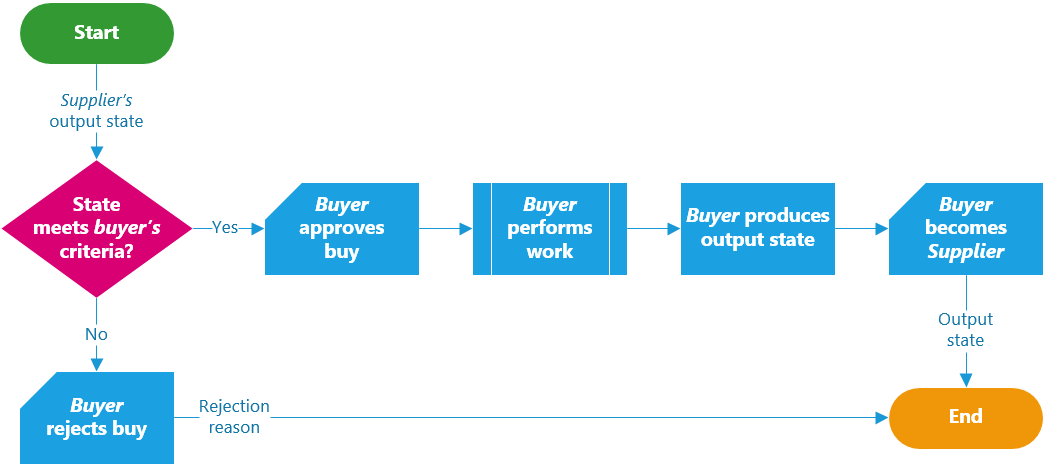
Design your system by components, and provide means for them to intercommunicate. On any system, components communication looks as next (parallelism was left out for simplicity purposes):

SupplierBuyer-Components

This resembles a manufacturing line, where products get built as they move from step to step:

SupplierBuyer-Manufacturing.

On a manufacturing line, all stations (steps) work under the Supplier-Buyer model:

  1. Each station acts as if it was a buyer from the previous station (supplier): When receiving the product from the previous station, it can decide whether to buy it or reject it.
    1. Each buyer has a measurable quality acceptance-criterion that is verified before buying the product.
    2. If the supplier provides items below the expected quality, then the buyer simply rejects it (in the case of the very first station, the supplier is usually the stockroom).
  2. Once a station buys the product, it will perform the next set of actions over the product.
    1. Once it has completely finished doing its part of the process, the buyer becomes a supplier and sells the product to the next station.
  3. By the end of the manufacturing line, the last station sells a finished good to the supply-chain, the stockroom, another manufacturing line, etc.
    1. This process continues being applied during the rest of the supply-chain process until it reaches the end-consumer.

Each station demands high quality when buying items from the previous supplier, and it also concerns on not supplying defective items to the next buyer..

In a similar fashion, each system’s component can be designed as next:

SupplierBuyer-Workflow-02

This follows the supplier-buyer model: If the supplier provides low-quality items (exits with a poor post-condition state), the buyer can simply reject it (i.e., pre-condition state was not met).

Under this model, changing components usually isolate all risks into a single area, and replacing components code becomes easier: all we care about is that all incoming work meets the pre-condition criteria, and that the post-condition is properly constructed for further steps.

This model can be applied both for synchronous and asynchronous operations, thus making it easy to adopt regardless of the system’s components workflow.

When combined with processing-queues this model shines, as it allows async scaling, sending items back to previous steps, retry operations, etc.

This model also adopts the fail-fast best practice, and makes refactoring less risky as all components work under promises both ways.

Fault-tolerant Systems (part 3) – SW patterns & best practices

If your organization is already stable as discussed on part 2, then you are ready to implement some stabilization patterns into your code.

SW patterns & best practices

Design your system with defensive techniques.

First things first!

Just like with the organizational pre-check, you must have all the next already in place before even attempting to move further with other deeper technical patterns. All the next basic techniques ensure (if implemented appropriately) technical stability.

Apply industry well-known best-practices.

  1. Use a Source Control Management system. It can be distributed for safer disaster-recovery scenarios, but specially to allow working “offline”. This allows you feel comfortable on making big refactoring as you can safely roll back to previous versions.
  2. Have and enforce programming coding standards. The recommendation is adopting industry or popular coding standards, so that you have higher chances that new hires are already on the same page as your team.
  3. Adopt industry standards for services and protocols. The community support and libraries-supply are far better than when your using your own custom implementation.
  4. Have peer reviews. You can decide whether a set of individuals, or any peer, can review code, design-documentation and so on. The seal of approval of your peers allows two things: finding issues during design or development, and allowing team members getting familiar with the rest of the design.
  5. Follow Object Oriented Design principles (S.O.L.I.D.). These are probably some of the best SW-engineering principles you can apply to boost scaling your code base as you add more features.
  6. Enforce a testing discipline during your SDLC, such as TDD or BDD, asides to unit tests. This increases the confidence that, although not perfect, the code is clean enough from bugs; also, refactoring becomes faster since it’s easier to spot when a change broke anything.
    • Design For Testing (DFT) is also great helper to maximize chances of finding bugs. Coding using the DFT-approach will help you instrumenting your code so that testing and recollecting tests-evidences is easier.
  7. Have a continuous-integration build server and make sure it runs the whole test suite periodically (even per each build or commit). This will help spotting when several changes from different persons broke the build.
  8. Have a professional, stable, test environment that matches production specs (or as close as, specially in topology). This way, your tests will run under very similar conditions than when ported to prod.
    • Another recommendation is to preferably have your test environment ready to be promoted as the production environment (same firewall rules, same services installed, same tiers, etc.). This way, in case you ever lose your production environment, your test environment can take over very quickly without having to improvise or to place long-waiting purchase orders.
  9. Adopt defensive programming techniques targeted for the programming languages used in the system. Find the ones that apply to your project and enforce them during peer-reviews.
    • As a best practice, try to verify incoming parameters on all methods, even private ones. This way, if someone happens to make sloppy changes, it will fail-fast.

Use HW and SW libraries that were fault-tolerant designed.

Do not reinvent the wheel: use already proven components that were made with fault-tolerance in mind, examples:

  • Robust network equipment with ports-redundancy
  • SAN storage
  • TCP communications
  • Guaranteed-delivery message-queues
  • Storage with redundancy
  • OS server-editions

Design your HW infrastructure and system architecture with a distributed or redundant mindset.

If possible, design your components to work on distributed architectures. Examples:

  • Use load-balancers
  • Use CDNs
  • Ensure having a server-farm attending all incoming requests
  • Split your system to have write-only and read-only instances

Additionally use stable, well-proven, widely-known, strongly-supported, SW libraries that have active development for all your core-components. If you want to go with the fads, then you will start having issues as soon as the fads get replaced with newer fads 3 months later and developers stop supporting all your newly created code. “Oldies but goodies” applies here.

Secure all layers!

Security must be implemented on several layers to avoid attacks from taking services down.

  • Some enterprise technologies already provide some degree of prevention to common attacks. Examples: firewalls, WAFs, robust application servers, etc.
  • The end-goal is having the system as secure as possible so that attackers cannot gain access to the infrastructure and take services down.

If you already have most of the things explained above already implemented, then you can start applying the next best practices.

Know your Estimated System Uptime (ESU)

Calculate the Estimated System Uptime (ESU) by multiplying all the yearly-uptime percentages of each component (and/or server) to see where you stand.

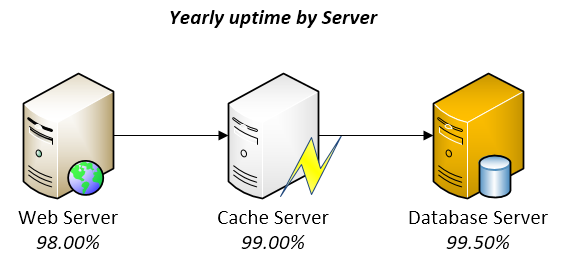
Take a look into the next oversimplified 3-tiers example:

Uptime.

At first sight, thought not perfect, it looks pretty reliable. However, when you multiply 0.98 x 0.99 x 0.995, you realize that the ESU would be of 96.53%! Multiply that by 365 days and you realize that you might easily have 12.66 full days without service! Imagine how the numbers go down as you add more components into your system on which complexity and unknowns grow and grow.

With a six-sigma approach on each component, i.e. 99.9999%, the math would be really different for the same 3-tiers example: the ESU would be of 99.9997%, which means you would have only 1.58 minutes of downtime per year! Awesome!

Now that you are aware of your system ESU, you know you have to do something to increase it dramatically in order to prevent significant loss-of-service. A way to increase uptime is by adding redundancy, i.e., prevent having any “single point of failure” in your system.

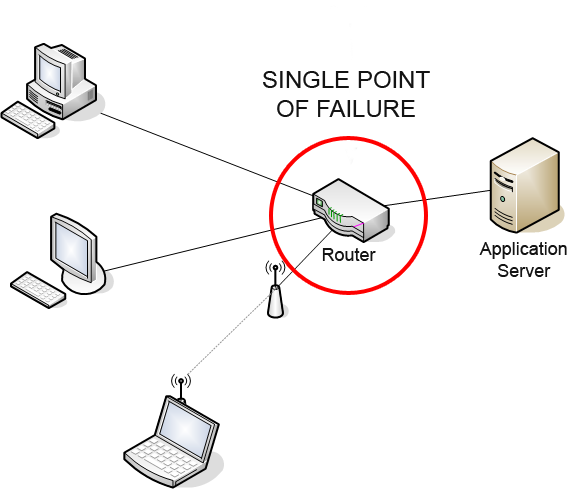
Detect all Single Point of Failure parts.

Single_Point_of_Failure

Credits: By Charles Féval (Own work) [GFDL, CC-BY-SA-3.0 or CC BY-SA 2.5-2.0-1.0], via Wikimedia Commons

A single point of failure (SPOF) is a part of a system that, if it fails, will stop the entire system (or the most important module) from working. A system might contain multiple SPOF parts.

Find in your system, both SW and HW, all SPOF parts and remediate them by changing your infrastructure architecture or your design.

  1. In SW, for example, a SPOF could be services that run in a single machine, which bring the entire system down if the service or machine goes down.
  2. In HW, for example, a SPOF could be a storage device with no redundancy, a router with single port, database server with no cluster, etc.

A SPOF can fail per-se (for example, a web-service process crashed), or because its container failed (for example, a web-service is down because the server crashed), or because it became a bottleneck (for example, a web-service is timing out because all threads are busy).

Once you have identified all SPOFs, you could add redundancy to HW or even redesign your system to support working on a distributed infrastructure (similar to redundancy, but slightly better). On each redundant HW, you would install the same SW services, and would need to adapt your system to smartly distribute the load among several redundant services.

As your system evolves and complexity grows, newer SPOFs could be introduced. Optimally, you would find them early at design phase; else you’d need to fix them on demand.

Ultraquality

On the book The Art Of Systems Architecting (Maier and Rechtin) ultraquality is defined as “the level of quality so demanding that it is impractical to measure defects, much less certify the system prior to use”. Ultraquality is demanded on critical systems such as space shuttles, aircraft, medical radiation equipment, etc.

Since ultraquality cannot be measured directly, it’s calculated based on stats, heuristics and design checks (for example, all redundancy levels are properly set).

Ultraquality is usually achieved by having a strict code-cleanness standard, superb testing methodology, well-defined and extremely controlled SDLC processes, HW built with top-notch durable materials and, at last, by adding redundancy on all layers to guarantee that, if one piece ever presents a defect, others will take over.

Keep in mind though that ultraquality also creates a new problem: Since ultraquality systems could fail only after several million operations, humans get so comfortable with an always-working-system that they cannot possibly imagine any failure could ever happen. Thus, if a failure ever occurs for whatever reason, humans are not prepared enough to react in accordance.

Create a detailed Disaster-Recovery plan

DisasterRecoveryA Disaster-Recovery plan is a set of artifacts, e.g. documents, scripts, servers, contact names, tape backups, that will be used to restore services after a wide range of catastrophic events such as “all servers got corrupted” or “a nuclear meltdown destroyed our data center”.

Believe or not, those type of things happen in real life and some systems, such as military, scientific research, technology-enabling and communications systems, must be able to tolerate most faults and, if it comes to the point of total inability, they must be able to be rebuilt from scratch to restore all services as soon as possible with the least possible amount of data-loss.

A Disaster-Recovery plan is not just artifacts you must lock down on a safe place: it’s an ongoing process that needs to be tested and updated frequently.

Considerations when creating a Disaster-Recovery plan.

  1. Assume that whoever that will execute the plan will need to recreate everything from scratch with zero knowledge about your system (it might be a team on another side of the world working for several days without sleep and no time to verify the correctness of your plan).
    • Providing executable scripts that can be run to recreate an environment is part of the plan.
  2. The plan must be reviewed by several actors. For example, peers, managers, stakeholders, legal, counterparts on another country, etc.
  3. Some pieces of the plan might be actions to be executed on a periodical basis. For example, the plan could include the location where the data backups are being stored or which is the secret key to recover them, but that also implies you are constantly backing up your data and storing it on the place you said they will be. If you must change the secret key, then you have to update the plan as well to include it.
  4. Ask yourself the next questions:
    • What would I need to restore all services and data if all servers go down?
    • Who is the main point of contact for each dependency? Who do they report to? Which organizations must be contacted?
    • Is the disaster-recovery plan stored safely on several Earth locations? (far apart from one another)
    • Which is the estimated time required to restore everything from scratch?
  5. You can always have replicas of your entire production environment on different locations and specify on your plan that such environments are ready to take over in case of a catastrophe broke the main env.

Once your plan is done, you must make drills (at least once per year) to test your plan actually works and that is still current. Such drills require you to go step by step, actually call the cellphones numbers that were noted in the plan, actually send emails as noted in the plan, restore the backups and verify they work, etc.

  • If anything fails during the drills (like email address is invalid, or a contact person no longer works for the company, backups are corrupted, etc.), then you must take action into fixing that.

On the next part, we will be able to take a look into SW patterns that help taking control over faulty scenarios.

Essay on fault-tolerant systems (part 2) – Bad organizations can kill your products

Organizations02

As I mentioned in part 1, large-complex SW can only be done in time by having tons of people concurrently working on it, which ends-up forming an organization of tasks and people. This is not exclusive to SW, but to any industrial product.

I’m pretty sure non-SW visitors will like this post as well, as there’s value that applies to all organizations regardless of their niche.

If your organization is very stable, you can skip this post and jump directly to part 3 (still under development).

Bad organizations can kill your products

“When an organization is unhealthy, no amount of heroism or technical expertise will make up for the politics and confusion that take root.” – Patrick Lencioni

The main organizational killer of any industrial product, such as enterprise software, is lack-of-stability. If your engineers are firefighting issues all the time, there’s never time to do the “right-thing right”.

If you overburden your employees with urgent tasks all the time, and you overwork them consistently, employees start getting stressed about not being able to meet deadlines, not making any progress and not even being able to do routine-things outside of work: engineers, like anyone else, have a personal life and have to pay bills, buy groceries, walk the dog, take the kids out, go to school meetings, sleep, eat, go to the doctor, workout, meet with friends, call their parents, buy shoes, etc.

If you remove all capacity from your employee to even do routine personal stuff, the stress levels will raise and the employee will become tired, sloppy, aggressive and, eventually, will quit.

If your organization have severe stability issues, there’s no point on moving forward with deeper technical changes, as any attempt to make complex refactors to fix the situation will be abandoned as soon as the next hot issue arrives.

You must first fix your organizational issues to stabilize the work-environment. After that, you can stabilize or improve your SW.

Symptoms of bad organizations

You must avoid at all costs enabling, endorsing or condoning a working atmosphere with sustained levels of stress or an unhealthy culture, since they will cause stability issues.

It doesn’t matter if your company advertises lots of “ethics and values” if they exist only on their brochure: the true ethics and values of a company are the ones the management-chain execute every day.

Here are some tips to help you recognize bad-org common symptoms and, hopefully, make something about them:

  1. High attrition levels.
    • Attrition causes the remaining employees to get even more stressed due the workload being split among the survivors.
    • Also, there’s always a domino effect: once an employee quits and spreads the word about greener fields, other employees start looking for jobs too. Other employees get anxious and start fearing that the job will not be stable since several persons are leaving the company, which makes them feel an urge to run before the company decides to shutdown the operation.
    • Replacing an employee can take months, which makes you waste time reading resumes, performing interviews, negotiating salaries, etc.
    • According to recent studies, it takes up to 9 months of salary just to replace a valuable team member (taking in account all implied costs such as impact on business, recruiters fees, hours invested in interviewing, etc.).
      • If you split “9 months’ worth of salary” among 36, you can easily realize the employee could have gotten a 25% raise for 3 years for the exact same money the company would lose by letting the employee leave. Simple math.
    • Attrition by itself can be caused by multiple reasons such as stress, long-working hours, bad salary, no promotions (or promoting the bad employees), seniors undermining juniors, etc.
      • Some organizations decide to self-deny that they have high-attrition levels by comparing them to “the rest of the teams” or “to other similar industries” (as if attrition was a good thing if everyone is suffering it too) but, if not properly reversed, attrition is a top morale-killer.
  2. Treat everything as Priority 1, every day.
    • If everything in your organization is labeled or treated as “Priority 1”, it means the management just does not care about prioritization at the expense of burning out the teams.
    • Even if tasks don’t get explicitly labeled as “Priority 1”, some phrases could be used in-lieu-of. Examples:
      • “Expedite this task ASAP, but these other 15 tasks have to also be done before lunch no matter what”.
      • “This project has high visibility. If you don’t close these 10 new tasks by today EOD, then upper management will come and get it fixed for us”.
    • When things are being correctly prioritized (i.e., priority 1, 2, 3…N), employees can focus on a single task at a time.
    • However, when management decides to treat all incoming emails, tickets and petitions with the same equal level of importance, only the next-most-visible-urgent-task will be flushed (which is rarely the next most important task).
  3. Long learning-curves for newcomers (regardless of their total years of experience).
    • If newcomers take a very long time to share the load with the team, the other employees still have to deal with the workload during all the learning phases.
    • The manager must define an effective on-board process that helps newcomers to adapt quicker, before stress kills the remaining employees that support the operation.
  4. Having hard dependencies on other teams or services to make your work.
    • If your team cannot effectively do their work without having hard dependencies on other people, probably you should consider restructuring the teams or defining a black & white charter of responsibilities per team.
  5. Struggling if one single team member resigns.
    • If it takes one single employee that quits to take your team down to its knees, you either have strong dependencies on individuals (which is a bad thing for an organization), lack of staff (also a bad thing, especially if you can afford more hiring), or you’ve just let your most valuable employee leave (probably for reasons such as “lack of recognition” or “no salary adjustment”).
  6. Lack of experienced people in the team and organization.
    • Don’t be cheap with your staff: Provide them high-quality training, offer competitive salaries and challenge them with interesting technical projects.
    • With that, employees will stick around you for longer, which means you’ll be able to utilize their experience in your products better.
    • Also, don’t hesitate hiring senior engineers. Their experience will help to reduce the issues as time goes.
  7. Lots of meetings (as in “every another hour” or worst) or tons-of-emails (as in “if you don’t constantly check your email every 10-15 mins, something really bad could happen”).
    • One thing is being collaborative, and other thing is needing to constantly communicate to avoid mayhem.
    • If cross-team coordination must be constantly reviewed and discussed, then it means no process is being followed and that everything is being resolved on the fly.
    • If everyone just knew exactly what to do, little communication would be needed.

Have you ever heard developers saying that their company has “poor management” or “too many internal politics” or is “very slow and bureaucratic“? Well, they literally refer all the symptoms described above (and, yes, those only 3 phrases are good-enough from a developer’s perspective to describe the entire situation).

Best practices to fix a broken organization

Set stabilization as a top-priority!

Some organizations choose to pretend there’s nothing broken with them and keep assigning operations tasks on the top of more urgent issues.

  • For example, they keep accepting new projects, instead of stabilizing the current ones.
  • Whenever lack-of-stability is damaging your team, all work should be focused to reach a stability-level. For example, close all critical SW bugs, stop attending to non-important meetings, stop accepting new work, get more reliable HW, cancel parked projects, reprioritize projects by impact, etc.
  • Remember that, even if you are making some changes to your SW and HW during this effort, this is still considered an organizational, not technical, task, since the goal is to stabilize the team.
  • Changes doesn’t have to be perfect, but they have to dramatically reduce support and time-waste so that the team can have a deep breath and regain control.

Reject impossible deadlines

Impossible deadlines yield to progress-slowdown and kills creativity, which makes late-projects even later. Individuals starts taking bad decisions just to meet the deadline:

  • Technical staff will start reducing quality in SW, skipping unit tests, coding just for the happy-path scenarios, hard-coding business logic, using libraries without appropriate license/legal/technical review, pushing changes directly to production, etc.
  • Managers will start imposing terrible decisions, such as reducing or eliminating test phases, requesting to skip code-reviews, demanding to patch instead of fix, ignoring input from expert technical staff, ignoring security concerns, ignoring compliance policies, etc.

Avoid multitasking or assigning multiple projects at the same time

Individuals should focus only on one task of one project at a time. Context-switch often costs a lot more than allowing developers to flush one task at a time.

  • Developers need to have a lot of “temporary data” in their heads while doing their work, from variables names to complex structures, environments they’re pointing to, design ideas, frequent file paths with log outputs, etc. If developers are frequently interrupted with other tasks, they must dump it all in order to load a completely new set of similar data for the new tasks, which can take hours just to regain full throttle.
  • Context-switch still occurs with “quick tasks”, “5-minutes meetings” or “tasks in-between tasks”, such as being asked to “quickly review a document and send an OK-email while your totally-unrelated-code still compiles”. All those will still cause the developer to lose an hour just to recover full throttle.

Hire the correct staff for your team

  1. Experienced engineers make a difference.
    • Have at least a couple of senior engineers and architects in your team, asides to other experienced members.
      • Architects should have opportunity to validate design ideas with someone just as experienced, which helps catching design-faults on time.
      • Architects must rely heavily on senior engineers to implement core-components. This practice both frees the architects from heavy tasks (allowing them to focus on more components design), and nurtures a learning-path for senior engineers to absorb knowledge from architects in an organic way.
      • Senior Engineers will eventually be prepared to take other complex projects on their own, which is a gain to the company.
    • Because of this staff redundancy, the system development can continue as usual (with minimum or zero impact) in case of medical leave, vacations or other absence situation, while still having experienced members looking out the conceptual integrity of the system.
  2. Hire professional QA members with system-test experience. They know better how to test system aggregations and partitions between components than regular developers.
    • With dedicated QA members, tests can be started as soon as the code becomes present on the continuous-integration builds, which provides faster turnaround rates between developers and testers (a major gain on large-systems development).
    • Just like with developers, there are many specializations for testers. Some testers specialize on web systems, others on APIs, others on infrastructure, etc. Get the right QA staff for your projects.
  3. Assign a dedicated Project Manager (or program manager, scrum master, etc.) to the development team.
    • The project manager should remove blocking issues from the rest of the team members, so team members can focus on their tasks as opposed on metawork.
    • Sounds obvious, but each metawork task causes context-switch, which has been discussed above.
    • Project Manager should also be in frequent contact with other important organizations, such as Legal or IT-Security, so that all compliance questions from the team can be expedited ASAP.

“Culture eats strategy for breakfast.” – Peter Drucker

Once you have reached a comfortable level of stability that makes work-days predictable, you can start applying patterns from part 3.

Essay on fault-tolerant Systems (part 1)

Fault-tolerant_control_of_discrete-event_systems_with_input-output_automata

Image: By Yannicknke (With a drawing software) [GFDL or CC BY-SA 3.0], via Wikimedia Commons

Disclaimer: This post is a long one. If I ever have to write a book about programming, this would be the topic I’d pick. Trust me: if only tech universities taught more about this, a lot more people would have been able to sleep during the entire night, have hot meals and enjoy reunions with family and friends. If you choose to continue reading, and apply the practices described in here, you’ll be glad you did.

Background

Fault-tolerant systems are one of the keys for succeeding in today’s enterprise software. Let me tell you a story.

On the past, around the 80s, companies could afford the luxury of delivering “a solution” to a problem, without having to make it “the best solution ever”. Computing was so new, that customers [that could actually afford computer goods] somehow could condone some failures. Technology was so expensive that people would prefer to commit themselves to pay for a system and deal with it until it was completely worn out. Also, there wasn’t much interoperability/compatibility with other systems, meaning systems wouldn’t talk each other unless coded by the same company. At last, not many companies could get into the technology business due lack of the-know-how and the expensive and risky investment this represented.

A side effect of these combined factors was that engineers didn’t have to worry too much about non-critical failures; not that they didn’t care, is just that they could rest assured that their customers would have to await for them to get the issues fixed, since their customers couldn’t afford switching to another system from the competition and jeopardize all their data and investment; after all, there wasn’t much competition anyway unless someone had a lot of bucks to start a new company with enough chances to just come and snatch an existent business. In few words: Once you paid for a system, you were basically locked in.

Fast-forward several decades. Nowadays many of those factors changed: Technology is much cheaper, there are a lot of compatibility standards and protocols, and most people have access to computer goods. A side effect of these factors is: Consumers demand permanent solutions in a very short amount of time (even unrealistic sometimes); if they don’t get their demands satisfied fast-enough and with the expected quality, they simply switch to the competition knowing there will be a way to migrate all their current data into a new system (a lot of companies invest in the “buy my product and I’ll migrate all your data for you” business). Consumers have become, thus, very demanding and impatient to failures, even subtle ones.

Consumers have become, thus, very demanding and impatient to failures, even subtle ones.

As consequence, the technology is very fast-paced today. New companies emerge out of nothing, and everyone has a chance to get a slice of the pie in this market without requiring to invest much. Moreover, there are also a lot of open-source projects that offer excellent solutions out-of-the-box at a lower or no-cost.

This can only mean one thing: Companies have little to no-room for failure. Any small annoyance could literally become into bad press and a reason for bankruptcy. Companies are now pushed hard to succeed at first or die. Losing customers is very easy. Every time a company offers a similar product than yours, snatching some of your customers, it means you are clearly missing something that is preventing your customer-base to grow and remain loyal. Check on what happened to Nokia, Yahoo, RIM, Kodak, etc.

All this story leads to one conclusion: you cannot risk failing. And, when you do, you must recover very fast.

How all this affect you as a software engineer?  

For a start, in everything.

All systems are subject to fail for a wide range of factors:

  • From small network glitches to full data centers blackouts.
  • From curious users that “clicked that button”, to proactive developers that “found a way to call your APIs indiscriminately”.
  • From annoying bugs introduced by your interns, to “artistic” bugs created by your architects (hidden deep down in the core of the system).

But before we get our hands dirty, let’s review the terminology of our discussion matter so we can focus accurately on the solutions:

  • System. Conjunction of two of more components that act harmoniously together.
    • Systems are not just mere ‘apps’ or ‘web-pages’. They are complex living entities with heavy intercommunication and integration among all their components. Systems are large by nature and require multiple individuals and teams to work together to meet the release date with the desired features.
  • Fault. Abnormal or unsatisfactory behavior.
    • Any development effort to overcome to faults usually falls under the accident of software category.
  • Tolerant. Immune, resilient, resistant. Keep going despite difficulties.

“Fault-avoidance is preferable to fault-tolerance in systems design” – The Art Of Systems Architecting (Maier and Rechtin)

We will not cover fault-tolerant nor self-healing algorithms; we will focusing only on best practices to make a system work as a whole.

Faults we want to avoid

The main key faults we want to prevent are:

  1. Loss-of-service, loss-of-data or misleading-results due SW failure or HW-corruption.
  2. Impossibility to recover from generalized-failure.
  3. Slow support responses or long-recovery times.

Vital features of the product have to be carefully designed so that they remain up-and-running longer than anything else does. For example, if the servers of a cloud-drive are presenting failures, the system must attempt using all its available resources so that users can still upload/download files and run virus scans, even if that means other features, such as thumbnail generation or email notifications, have to be completely turned off (think of a QoS analogy within SW boundaries).

Vital features of the product have to be carefully designed so that they remain up-and-running longer than anything else does.

There are, of course, many other advantages on designing systems with fault-tolerance (such as gains in performance and scalability in some cases) but, at the end of the day, they will all fall into one of the three categories listed above which all basically sum-up to “keep customers happy” and “be cost-effective”.

What causes the failures in systems?

In general, the failures show up after one or more faults happen. Some failures remain latent until a certain fault scenario is met.

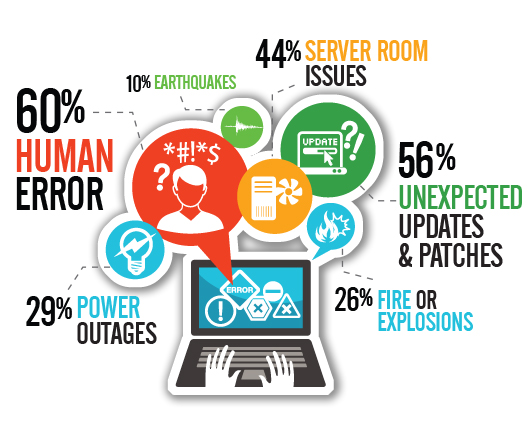
Faults can be introduced/caused by several factors, such as human mistakes, direct attacks or pure bad luck. Human mistakes account for the major cause: systems are created by people and consume libraries created by people, they are tested by people, later deployed by people on HW designed by people, running on … you get the idea!

Once a fault starts, it creates more and more faults in-cascade until one or more failures occur. For example, a memory leak might eventually consume all physically memory, which might make the system to use virtual memory, which might make all threads to process slower, which might exhaust the thread pool because threads are not being returned back on time, which might cause the threads to get blocked and requests to get piled in the request-queue, which might cause deadlocks, which might cause crashes (if the memory-abuse itself did not cause the crash before).

It is mostly unpredictable knowing when faults will happen or what will trigger them, but you can design your system to prevent most-common causes of faults-introduction and to recover quicker from them.

Faults decrease by doing the right thing

Since most faults are introduced by human mistakes, it makes sense to perform the next two actions:

  1. Prevent situations that lead towards sloppy, distracted, chaotic or careless development. This is mostly a human-based aspect.
  2. Design the systems to detect, circumvent or recover from fault-states that could not be prevented by other means. This is mostly a technical-based aspect.

I have found that most-critical SW failures are commonly caused, either directly or indirectly, by companies’ organizational issues.

And it cannot be otherwise! Systems require a lot of people and teams working concurrently on each of the SW and HW pieces, which demands outstanding cross-communication and collaboration to allow producing as much as possible without stepping each other’s feet, without breaking the build and without incurring into maintainability issues.

Designing systems with the right balance between budget, features-scope, code-quality and total effort is a choice the organization makes.

The way teams are managed seriously affects, positively or negatively, the quality of the final product.

Regarding technical matters, there are several best-practices and well-proven patterns the tech staff can apply to avoid faults, or to recover from them quicker. By using those techniques, the team can focus more time on the essence of SW, i.e. features that make their product unique.

Let’s review what can be done at organizational and technical levels on the next parts.