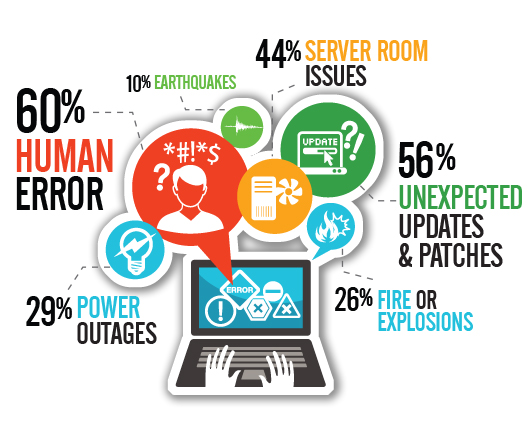
If your organization is already stable as discussed on part 2, then you are ready to implement some stabilization patterns into your code.
SW patterns & best practices
Design your system with defensive techniques.
First things first!
Just like with the organizational pre-check, you must have all the next already in place before even attempting to move further with other deeper technical patterns. All the next basic techniques ensure (if implemented appropriately) technical stability.
Apply industry well-known best-practices.
- Use a Source Control Management system. It can be distributed for safer disaster-recovery scenarios, but specially to allow working “offline”. This allows you feel comfortable on making big refactoring as you can safely roll back to previous versions.
- Have and enforce programming coding standards. The recommendation is adopting industry or popular coding standards, so that you have higher chances that new hires are already on the same page as your team.
- Adopt industry standards for services and protocols. The community support and libraries-supply are far better than when your using your own custom implementation.
- Have peer reviews. You can decide whether a set of individuals, or any peer, can review code, design-documentation and so on. The seal of approval of your peers allows two things: finding issues during design or development, and allowing team members getting familiar with the rest of the design.
- Follow Object Oriented Design principles (S.O.L.I.D.). These are probably some of the best SW-engineering principles you can apply to boost scaling your code base as you add more features.
- Enforce a testing discipline during your SDLC, such as TDD or BDD, asides to unit tests. This increases the confidence that, although not perfect, the code is clean enough from bugs; also, refactoring becomes faster since it’s easier to spot when a change broke anything.
- Design For Testing (DFT) is also great helper to maximize chances of finding bugs. Coding using the DFT-approach will help you instrumenting your code so that testing and recollecting tests-evidences is easier.
- Have a continuous-integration build server and make sure it runs the whole test suite periodically (even per each build or commit). This will help spotting when several changes from different persons broke the build.
- Have a professional, stable, test environment that matches production specs (or as close as, specially in topology). This way, your tests will run under very similar conditions than when ported to prod.
- Another recommendation is to preferably have your test environment ready to be promoted as the production environment (same firewall rules, same services installed, same tiers, etc.). This way, in case you ever lose your production environment, your test environment can take over very quickly without having to improvise or to place long-waiting purchase orders.
- Adopt defensive programming techniques targeted for the programming languages used in the system. Find the ones that apply to your project and enforce them during peer-reviews.
- As a best practice, try to verify incoming parameters on all methods, even private ones. This way, if someone happens to make sloppy changes, it will fail-fast.
Use HW and SW libraries that were fault-tolerant designed.
Do not reinvent the wheel: use already proven components that were made with fault-tolerance in mind, examples:
- Robust network equipment with ports-redundancy
- SAN storage
- TCP communications
- Guaranteed-delivery message-queues
- Storage with redundancy
- OS server-editions
Design your HW infrastructure and system architecture with a distributed or redundant mindset.
If possible, design your components to work on distributed architectures. Examples:
- Use load-balancers
- Use CDNs
- Ensure having a server-farm attending all incoming requests
- Split your system to have write-only and read-only instances
Additionally use stable, well-proven, widely-known, strongly-supported, SW libraries that have active development for all your core-components. If you want to go with the fads, then you will start having issues as soon as the fads get replaced with newer fads 3 months later and developers stop supporting all your newly created code. “Oldies but goodies” applies here.
Secure all layers!
Security must be implemented on several layers to avoid attacks from taking services down.
- Some enterprise technologies already provide some degree of prevention to common attacks. Examples: firewalls, WAFs, robust application servers, etc.
- The end-goal is having the system as secure as possible so that attackers cannot gain access to the infrastructure and take services down.
If you already have most of the things explained above already implemented, then you can start applying the next best practices.
Know your Estimated System Uptime (ESU)
Calculate the Estimated System Uptime (ESU) by multiplying all the yearly-uptime percentages of each component (and/or server) to see where you stand.
Take a look into the next oversimplified 3-tiers example:
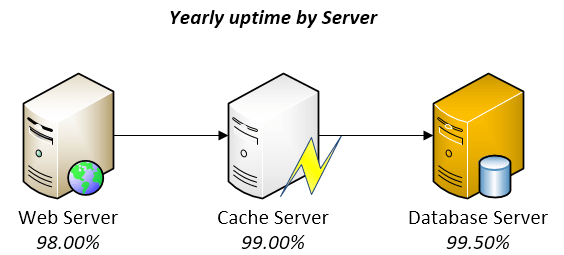
At first sight, thought not perfect, it looks pretty reliable. However, when you multiply 0.98 x 0.99 x 0.995, you realize that the ESU would be of 96.53%! Multiply that by 365 days and you realize that you might easily have 12.66 full days without service! Imagine how the numbers go down as you add more components into your system on which complexity and unknowns grow and grow.
With a six-sigma approach on each component, i.e. 99.9999%, the math would be really different for the same 3-tiers example: the ESU would be of 99.9997%, which means you would have only 1.58 minutes of downtime per year! Awesome!
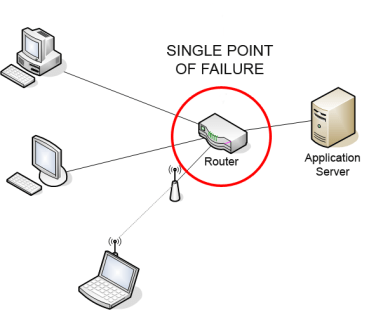
Now that you are aware of your system ESU, you know you have to do something to increase it dramatically in order to prevent significant loss-of-service. A way to increase uptime is by adding redundancy, i.e., prevent having any “single point of failure” in your system.
Detect all Single Point of Failure parts.
Credits: By Charles Féval (Own work) [GFDL, CC-BY-SA-3.0 or CC BY-SA 2.5-2.0-1.0], via Wikimedia Commons
Find in your system, both SW and HW, all SPOF parts and remediate them by changing your infrastructure architecture or your design.
- In SW, for example, a SPOF could be services that run in a single machine, which bring the entire system down if the service or machine goes down.
- In HW, for example, a SPOF could be a storage device with no redundancy, a router with single port, database server with no cluster, etc.
A SPOF can fail per-se (for example, a web-service process crashed), or because its container failed (for example, a web-service is down because the server crashed), or because it became a bottleneck (for example, a web-service is timing out because all threads are busy).
Once you have identified all SPOFs, you could add redundancy to HW or even redesign your system to support working on a distributed infrastructure (similar to redundancy, but slightly better). On each redundant HW, you would install the same SW services, and would need to adapt your system to smartly distribute the load among several redundant services.
As your system evolves and complexity grows, newer SPOFs could be introduced. Optimally, you would find them early at design phase; else you’d need to fix them on demand.
Ultraquality
On the book The Art Of Systems Architecting (Maier and Rechtin) ultraquality is defined as “the level of quality so demanding that it is impractical to measure defects, much less certify the system prior to use”. Ultraquality is demanded on critical systems such as space shuttles, aircraft, medical radiation equipment, etc.
Since ultraquality cannot be measured directly, it’s calculated based on stats, heuristics and design checks (for example, all redundancy levels are properly set).
Ultraquality is usually achieved by having a strict code-cleanness standard, superb testing methodology, well-defined and extremely controlled SDLC processes, HW built with top-notch durable materials and, at last, by adding redundancy on all layers to guarantee that, if one piece ever presents a defect, others will take over.
Keep in mind though that ultraquality also creates a new problem: Since ultraquality systems could fail only after several million operations, humans get so comfortable with an always-working-system that they cannot possibly imagine any failure could ever happen. Thus, if a failure ever occurs for whatever reason, humans are not prepared enough to react in accordance.
Create a detailed Disaster-Recovery plan
 A Disaster-Recovery plan is a set of artifacts, e.g. documents, scripts, servers, contact names, tape backups, that will be used to restore services after a wide range of catastrophic events such as “all servers got corrupted” or “a nuclear meltdown destroyed our data center”.
Believe or not, those type of things happen in real life and some systems, such as military, scientific research, technology-enabling and communications systems, must be able to tolerate most faults and, if it comes to the point of total inability, they must be able to be rebuilt from scratch to restore all services as soon as possible with the least possible amount of data-loss.
A Disaster-Recovery plan is not just artifacts you must lock down on a safe place: it’s an ongoing process that needs to be tested and updated frequently.
Considerations when creating a Disaster-Recovery plan.
- Assume that whoever that will execute the plan will need to recreate everything from scratch with zero knowledge about your system (it might be a team on another side of the world working for several days without sleep and no time to verify the correctness of your plan).
- Providing executable scripts that can be run to recreate an environment is part of the plan.
- The plan must be reviewed by several actors. For example, peers, managers, stakeholders, legal, counterparts on another country, etc.
- Some pieces of the plan might be actions to be executed on a periodical basis. For example, the plan could include the location where the data backups are being stored or which is the secret key to recover them, but that also implies you are constantly backing up your data and storing it on the place you said they will be. If you must change the secret key, then you have to update the plan as well to include it.
- Ask yourself the next questions:
- What would I need to restore all services and data if all servers go down?
- Who is the main point of contact for each dependency? Who do they report to? Which organizations must be contacted?
- Is the disaster-recovery plan stored safely on several Earth locations? (far apart from one another)
- Which is the estimated time required to restore everything from scratch?
- You can always have replicas of your entire production environment on different locations and specify on your plan that such environments are ready to take over in case of a catastrophe broke the main env.
Once your plan is done, you must make drills (at least once per year) to test your plan actually works and that is still current. Such drills require you to go step by step, actually call the cellphones numbers that were noted in the plan, actually send emails as noted in the plan, restore the backups and verify they work, etc.
- If anything fails during the drills (like email address is invalid, or a contact person no longer works for the company, backups are corrupted, etc.), then you must take action into fixing that.
On the next part, we will be able to take a look into SW patterns that help taking control over faulty scenarios.
 quadrabits


You must be logged in to post a comment.